
Are you ready to master Google reviews and use them to get more of the patients you want? You’re in the right place.

Do you know how reviews help dental practices grow?
Maybe you already know that reviews are one of the most powerful ways to bring in new patients and become a top-tier provider, but you’re feeling the headache (and time suck) of review generation.
Or maybe you have a solid review invitation strategy, but aren’t quite sure how many you need or how to respond so they can have their full impact.
This guide has the expert insights you need to become a top tier practice on Google, dominate your local market, and get more of the patients you want.
Dental practices that know how to use the power of reviews attract the 43% of patients willing to go out-of-network and pay more for a practice with a great reputation.1
You’ll learn:
1 https://www.softwareadvice.com/resources/how-patients-use-online-reviews/

Key Takeaway: Google reviews are the magic key to showing up in Google searches for dentists and winning over patients willing to pay more for your services.
You don’t need the biggest marketing budget to be the most highly-rated and highest-charging competitor in your area. You just have to be smart about showing up where patients are looking for you.
A recent Dental Economics survey of over 6,000 dentists showed that 57% planned to maintain their marketing budget and 24% planned to increase their marketing spend in the upcoming year.2
In a landscape of higher and more competitive spending, dental practices that aren’t using organic growth strategies to grow for free are missing out big time.
The facts are clear: Patients find and evaluate dental practices on Google.Reviews help with both. First, they ensure you get in front of prospective patients looking for a dentist, and then they show how awesome your practice is and convince them to give you a shot.
Growing your reputation and earning more of the high-value patients who find you online raises your profile, matures your practice, and brings you in line with the most premium dentists.
So, whether your goal is more patients, less time spent finding said patients, or an elevated reputation and ability to charge more and work less – mastering your Google ranking is your ticket to success on your terms.
The great news is that you have control over where you show up in search rankings. Next up, how Google ranks dental practices and why reviews are so important to rankings.
2 https://www.dentaleconomics.com/practice/marketing/article/14173977/results-of-the-2020-dental-marketing-survey
3 https://www.softwareadvice.com/resources/how-patients-use-online-reviews/
4 https://momentfeed.com/blog/50-mobile-local-search-statistics-you-need-to-know-2021/
5 https://www.qualtrics.com/blog/online-review-stats/
6 https://www.softwareadvice.com/resources/how-patients-use-online-reviews/

Key Takeaway: Your web presence and reviews determine how prominently your practice appears on Google. Improving your business profile and your reviews will boost your views and conversions.
Google’s rankings are simply the order in which the search engine shows businesses to a searcher.
Just like you earn money when more patients set appointments, Google earns money when its website visitors keep coming back to conduct more searches (and view more advertisements). So its whole aim is to show the most relevant result to each searcher so they have a simple, smooth experience.
Before you get bogged down with terminology or endless articles about Google rankings and search engine optimization (SEO), just remember that it comes down to one simple idea.
Google wants to make sure that when someone searches “best dentist near me,” that’s what they find.
You run a great practice, and you’re simply using reviews to show Google why your practice should be recommended to their searchers.
To determine rankings, search engines use automated signals to evaluate businesses’ relevance. That includes analyzing your web presence as well as the user’s geography and inferred preferences based on their past searches.
Before we get into the easiest ways to rise in the rankings, let’s cover some commonly misunderstood Google basics. If you’ve ever hired dental marketers to help with your practice’s SEO and didn't see the results you hoped for – read on.
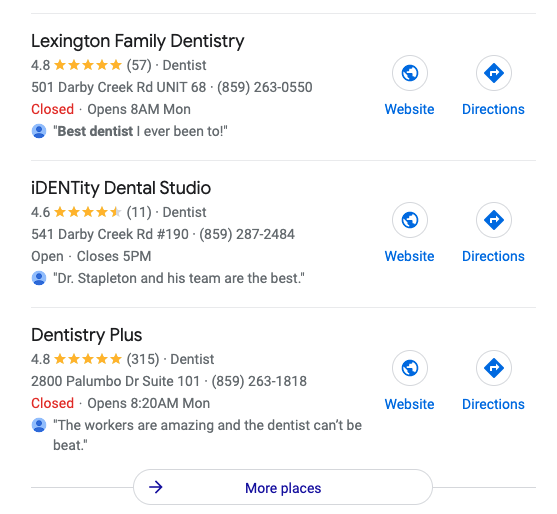
There are two types of Google rankings. When someone searches for a local business, they’ll first be shown what’s called a “Local Pack.” This will show 3 - 5 business with data pulled right from Google, including star rating, review snippets, and location on a map.
After the Local Pack, they’ll see traditional organic results, which is simply a list of blue links to websites that require a user to click to visit the website and evaluate from there.
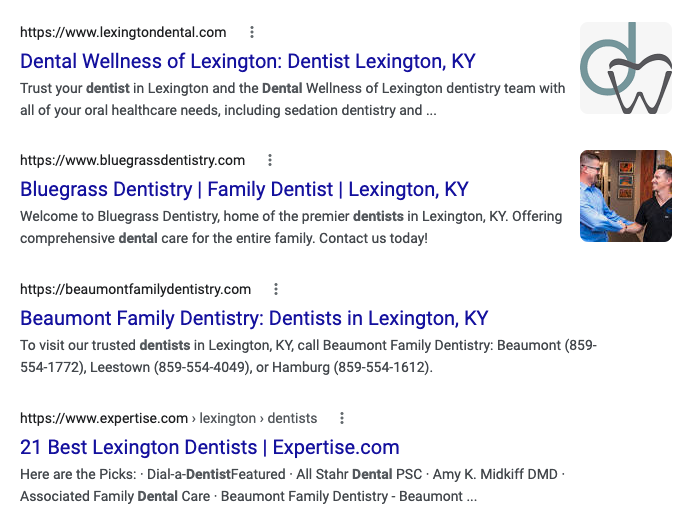
Most dental marketers that advertise SEO services help you rank higher in organic results at the bottom of the page. Not only is this expensive and time-intensive, but it isn’t the most impactful, because 2 out of 3 prospects look at the Local Pack and don’t scroll further down the page.7 Plus, your place in the Local Pack might be something you can control… for free.
This guide will cover how to use your Google Business Profile and your reviews and responses to rise in the rankings that actually matter. We’ll leave the decision of whether or not to keep your SEO service up to you.
We can use what we know about search rankings to get in front of the right searchers. Here are the top two things Google considers when choosing businesses for the Local Pack.8
To get the most impact for your effort, we recommend focusing your attention there. Once you’ve mastered those two areas, you can come back to other on-page SEO strategies.
If your Google Business Profile is complete, as many established dentists’ pages already are, it’s time to consider reviews. Google’s John Mueller reported: “Google review count and review score factor into local search ranking. More reviews and positive ratings can improve your business’ local ranking.”9
But the value of reviews doesn’t end when you show up in the top spot on Google.
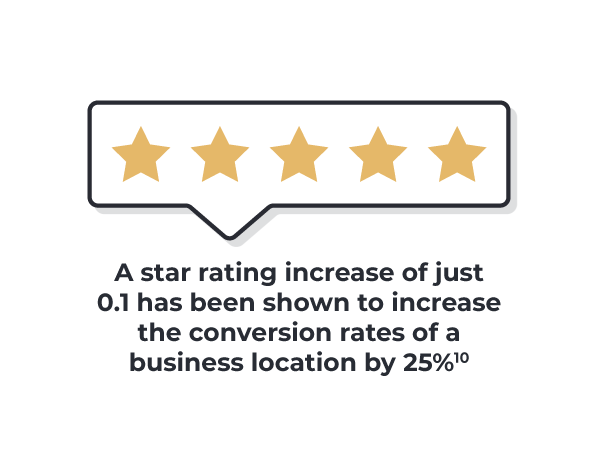
Your reviews are a huge draw to prospects when they see you in the top three results. Just how important are your ratings? A star rating increase of just 0.1 has been shown to increase the conversion rates of a business location by 25%.10
Keep reading to learn how to get the most out of your reviews strategy, alleviate the headache of review sourcing, and understand why letting a few reviews come in each month isn’t enough.
First up, setting up your Google Business Profile. If you’ve already set up and optimized your profile, skip ahead to Step 2: Earning Google Reviews With Way Less Effort.
Now that you’re a Google rankings pro, let’s get into the nitty gritty, starting with how to optimize your Google Business Profile.
8 https://www.brightlocal.com/learn/key-ranking-factors-for-local-seo/
9 https://www.searchenginejournal.com/google-star-ratings-guide/416951/#close
10 https://uberall.com/en-us/company/press-releases/study-brick-and-mortar-businesses-small-increase-in-online-ratings-boosts-conversion-by-25-percent
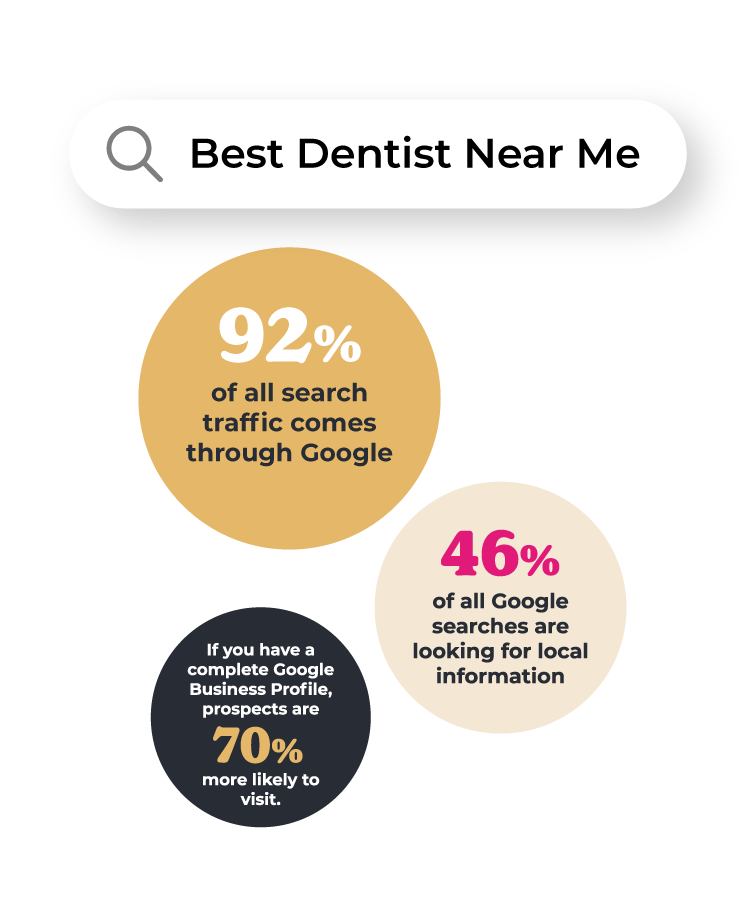
Key Takeaway: Claim and complete all the fields on your Google Business Profile before you focus on gathering reviews. This will boost your SEO and set you up for success.
If you’re going to be in the top three Google results and draw all the new traffic of high-paying prospective patients, you first have to be sure that you’ll actually show up. Setting up your Google Business Profile (formerly known as Google My Business) correctly ensures that new patients can find you.
Why does it matter? We have not one, but three convincing reasons:
Clearly it’s worth doing more than a superficial job filling out your Business Profile the right way.
If your practice is on the newer or smaller side, you might not be on Google at all yet. It just takes two quick steps to get set up.
Most likely, your practice is already on Google. But even if you have a listing, you might not be making the most of it. Just like healthy teeth, your profile needs its own semi-annual cleaning.
You would be surprised how many high-status practices don’t have a completed profile. The more information you provide, the more likely you are to get in front of the right searcher and maybe even rise above more established practices.
Here are some tips:
Q: What if I don’t have a web presence?
A: You don’t technically need a website to set up your Google Business Profile, but we highly recommend at least standing up a simple website if you don’t have one already. Having a web presence makes your practice appear more professional, polished, and trustworthy and it gives visitors a chance to learn more about your services.
Q: How do I manage multiple locations?
A: On the top right corner of your Google Business Dashboard, find the “Add Business” drop-down menu, click “Add Single Business” and add the information for any additional practice locations. They’ll each show up as their own listing for nearby searchers.
Q: What about other search engines?
A: Although Google isn’t the only place people search for dentists, it is the most important by a mile. Like we said before, 92% of all search traffic comes through Google.14 Before you focus on your Yelp, Healthgrades, Zocdoc, Vitals, 1-800 Dentist, or Facebook profiles, try to get your reputation on Google in a good place. However, do note that if your business is listed on other sites, it’s important to keep your information – like hours and contact information – consistent.
Now that you’re all set up on Google, it’s time to move on to step 2: Earning Google Reviews With Way Less Effort.
11 https://blog.hootsuite.com/google-my-business/
12 https://www.socialmediatoday.com/news/12-local-seo-stats-every-business-owner-and-marketer-should-know-in-2019-i/549079/
13 https://blog.hootsuite.com/google-my-business/
14 https://blog.hootsuite.com/google-my-business/
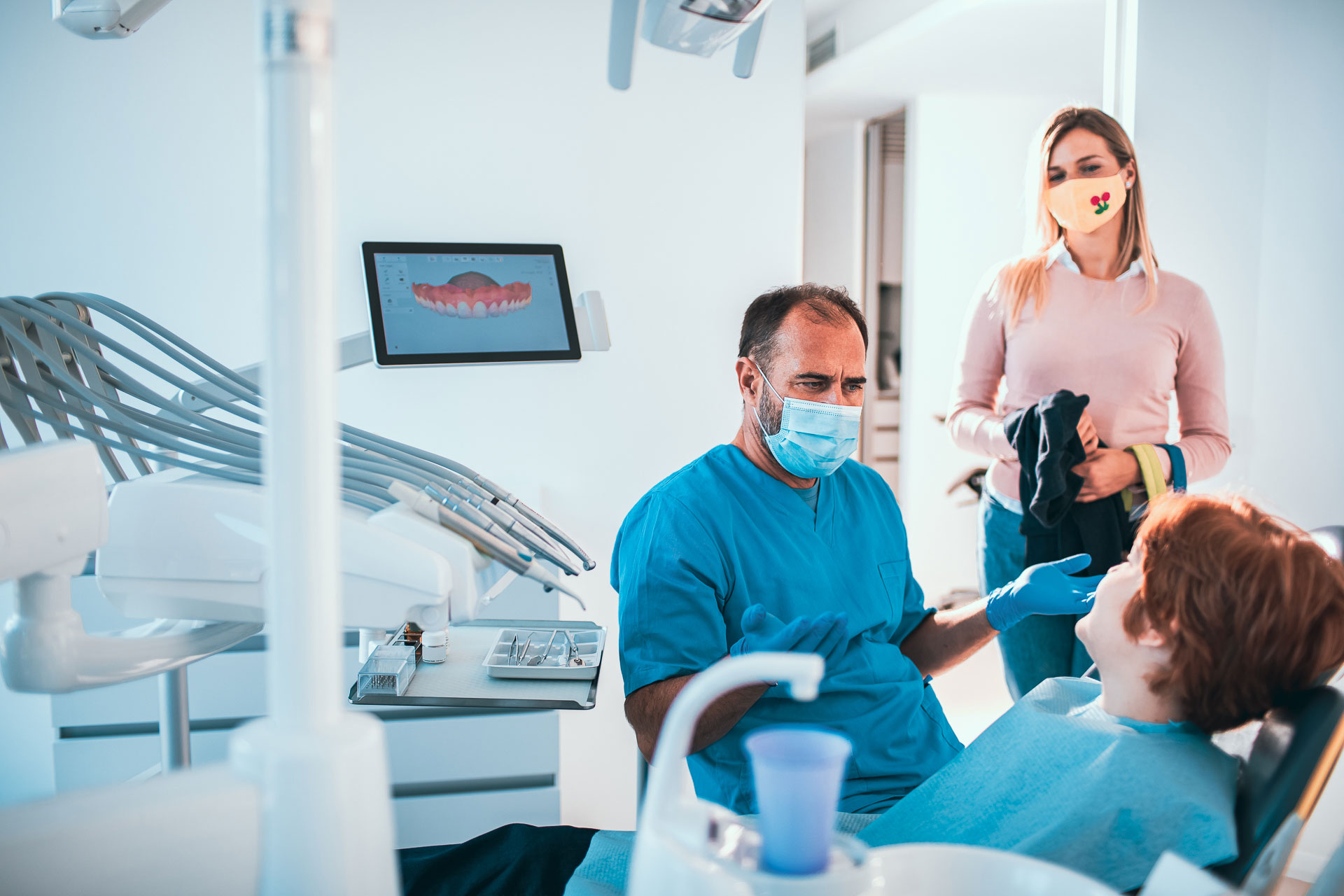
Key Takeaway: Getting lots of Google reviews doesn’t need to be a headache. We’re serious. Turn your happy patients into a glowing reputation with very little effort by setting up automatic review request text messages. Set it, forget it, and watch your brand sparkle.
Reviews are the easiest, cheapest way to improve your visibility on Google. It’s possible you’re new to the world of reviews and haven’t ever focused on them before. If so, you have the chance to skip the hard way and go straight to the easy way to generate reviews.
We talk to dentists every day and we know what a slog review generation can be.
Many practices instruct their office staff to ask for reviews as patients leave the office and others even follow up with text or call requests for reviews. Not only is this high-effort and hard to remember, but it doesn’t yield great results. On the way out the door, most patients have already moved on to the next part of their day and don’t have time to immediately write a review.
Asking patients for a review in person or via manual text typically yields 1 in 10 completed reviews and takes 2 minutes per person.15
It doesn't have to be that way. Let’s look at how to get that number closer to 1 in 4 while spending zero time on it.
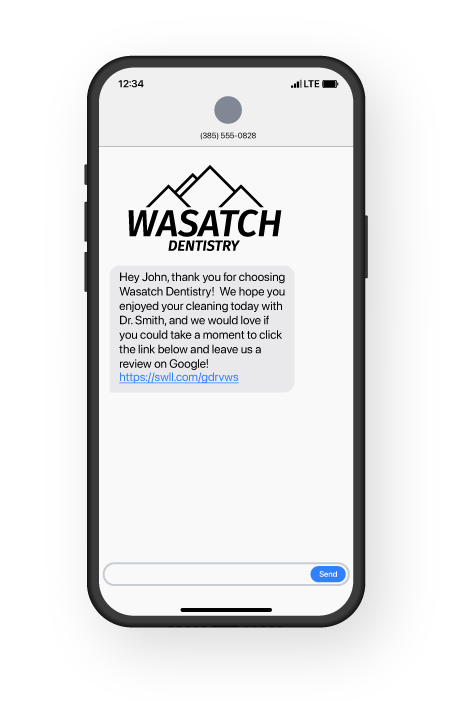
In-person requests can get you started, but to achieve consistent reviews, you need to automate your review request process.
With the right software, you can set up customized review request text messages that will be sent automatically after a patient completes a visit. The review invite texts are fully customizable and are sent directly from your office’s main phone number. You can personalize them with:
When you use automated software to send out review requests you can save time and take advantage of best practices for getting more responses.
Best practices for sourcing reviews:
Dental practices that use automated review request text messages typically see 1 in 4 completed reviews with 0 time spent after the original set-up process.17
Busy practices are sending out hundreds of review requests and reminders every week with absolutely no time spent sourcing them. For offices that are currently asking patients in person or manually sending out text messages asking for reviews, automation can save them hours (yes, you read that right) each week.
Aside from how to easily source your reviews, there are a few things you might wonder about when putting together a review strategy for your practice.
What if your rating is lower than five stars? If you find yourself worrying about a negative review or a less-than-perfect star rating, we’ve got great news.
Prospective patients don’t expect perfection. In fact, they don’t even want it.
According to a study by Northwestern University researchers, the likelihood of choosing a business peaks somewhere between 4.2 and 4.5 stars. As the rating approaches 5, the chance of being chosen drops.18

Sound counterintuitive? Consider it from this perspective.
Reviews aren’t new. Every internet user is familiar with reviews and knows that every single business has its detractors. Naturally, if there are too many detractors or the reviews are too scathing, the business isn’t appealing. But if the business only has 5 star reviews, they don’t assume it’s perfect. They wonder if something is fishy.
Having an authentic mix of positive and negative reviews signals that a business is real and trustworthy. So don’t sweat it if you have a few not-so-stellar reviews marring your Google listing. Aim for that sweet spot from 4.2 - 4.5 and you’ll be good to go.
Negative reviews won’t hurt your ranking either. Google has explicitly stated that it values all reviews and even mentions that a mix of positive and critical reviews can help your ranking.19
Don’t let fears about a negative review hold you back from setting up an automated review request process. Of course, continue providing an excellent patient experience, but remember that volume of reviews is more important than preserving a perfect 5 stars.
As for those critical reviews? We’ll get to the importance of responding to both positive and not-so-great reviews in part 3.
Almost any patient is a good candidate to ask for a review. Like we said, a few negative reviews are simply part of the process, so we recommend sending review requests to every patient. Plus, Google opposes “review gating,” the practice of purposefully hand selecting only 5 star reviews and trying to prevent any potentially negative review.
By setting up automatic review invitations to go out at the right interval after a visit, you give the patient a chance to respond when they are most likely to be happy with their experience. For example, after they have had time to recover from a complicated procedure.
If there’s a patient who wouldn’t be comfortable providing a public review, you can always request that they offer some private feedback instead. Ultimately, with review request automation, you can select patients who should never receive review requests and they will be removed from any automated messages.
Let’s look at a killer review and see what it’s doing right.
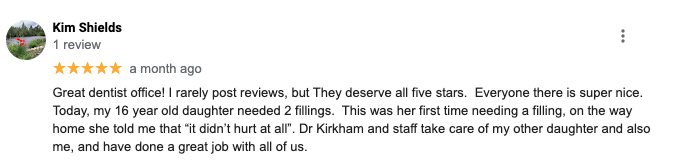
A good review is detailed. This reviewer didn’t skimp on specifics - they included the dentist’s name and lots of information about their visit.
A good review includes keywords. Remember, keywords are phrases someone might search for that you want to lead them to your practice. Having phrases like “tooth extraction” and “dental cleaning” in your reviews can help you rank higher when someone uses those terms in a Google search.
If you want to get more high-quality reviews, just ask! You can write your review request text message to specifically ask that the patient leave a “detailed review.”
If you’ve spent any time focused on getting more reviews, you might have encountered the murky world of reviews for sale.
Just like any other form of dishonest marketing; this is a poor strategy. Not only do you risk being caught and losing credibility with your current and prospective patients, but it can do more harm than good to your standing on Google. That means you risk becoming less visible, not to mention flushing cash down the drain.
Google’s policies state: “Reviews are automatically processed to detect inappropriate content like fake reviews and spam. We may take down reviews that are flagged in order to comply with Google policies or legal obligations.”20
Plus, some businesses that have fallen prey to review buying schemes claim their Google Business Profile was penalized by pushing them down the page or out of their Local Pack entirely.
If you’re running a great practice, you don’t need to pay for fake reviews. The resource you need (happy patients) is already there, untapped, just waiting to be enlisted in the right strategy to go to work for your brand.
You’re not quite done once you get the reviews flowing in; how you respond matters, too. Keep reading to learn how to respond to reviews and snag some of our easy response templates in part 3: Responding the Right Way.
15 Swell internal research
16 https://www.powerreviews.com/blog/when-to-ask-for-reviews-best-practice-guide/
17 Swell internal research
18 https://spiegel.medill.northwestern.edu/wp-content/uploads/sites/2/2021/04/Online-Reviews-Whitepaper.pdf
19 https://searchengineland.com/google-says-it-values-all-local-reviews-both-positive-and-negative-376503
20 https://support.google.com/contributionpolicy/answer/7400114?hl=en#zippy=%2Cimpersonation

Key Takeaway: Respond to every review if you want to keep your reputation and ranking high – but especially the negative ones. Keep your responses positive, general, and brief and you’ll be all set, with no stress or wasted time to show for it.
Responding to your practice’s Google reviews matters for two reasons: reputation and rankings.
Plus, companies responding to reviews is just the modern expectation. 53% of customers say businesses should take less than a week to respond to a review. 33% say the business should take three days or fewer for a negative review.23
Survey Says: 89% of searchers are ‘fairly’ or ‘highly’ likely to pick a business that responds to every review.24
To respond to a review, all you have to do is log in to your Google Business Profile, select “Reviews,” and click “Reply” next to your selected review. If you use reputation management software, you can reply to reviews right from your dashboard.
To get your responses right, here are a few things to keep in mind.
Insider Tip: Even some of the most successful dental practices don’t know that using keywords in your review responses gives you a big SEO boost.
For example, if you offer cosmetic dentistry, this is your opportunity to say so. If the reviewer mentions it, your response can include a line like “Thanks for your review, we love providing cosmetic dentistry!”
Then, when someone in your area searches for “cosmetic dentistry” you’re more likely to show up at the top of the Local Pack.
Before we get into specific responses, remember to stay HIPAA compliant. In other industries, businesses can say pretty much anything when they respond to a customer – including providing specific details about the person and their visit or purchase.
For dental and medical practices, it’s a whole different ball game. Just like in everything else your practice does, patient privacy is the highest priority. Don’t put your practice or staff at risk by forgetting that review responses are public and have the potential to compromise HIPAA.
The key, of course, is to avoid providing any personal information about your reviewer.
Here are some common tips for HIPAA-compliant review responses:
If you use a review management platform, you can set up a variety of HIPAA-compliant response templates so your staff can choose between options that have already been approved.
Responding to a positive review is your opportunity to respond with keywords. You can repeat any references the patient made to their service. Overall, keep it friendly and brief, always focusing on your gratitude for the reviewer taking the time to help out with your reputation.
Positive Review Response Templates:
In summary, when you get a positive review:
A few negative reviews shouldn’t keep you up at night. While a business with mainly negative reviews will scare away 94% of prospects25, those numbers aren’t the same if you mostly have great reviews with one or two rotten ones.
Plus, as bad as it feels to get a crappy review, maybe one will give you an idea of how to improve your practice in a way that will lead to more happy patients in the future.
Responding to a negative review is your opportunity to show who you are. In the process, you might even win over someone who reads it. In one survey, 45% of review readers said they were actually more likely to visit a business if it always responded to negative reviews.26
Before you type out a response, take a deep breath and confer with your team. It’s not worth sending a hasty reply in the heat of the moment that might not reflect your practice’s values.
Negative Review Response Templates:
In summary, when you get a negative review:
Responding to a review shouldn’t take longer than a minute or two, and it can make a big difference, including reducing the impact of negative reviews by 70%. Once you’ve gotten in the groove of getting and responding to reviews, it’s smooth sailing.
From there, it’s easy to turn your glowing reputation and higher ranking into more great patients. That’s step 4: Converting Search Engine Traffic.
21 https://support.google.com/business/answer/7091?hl=en#zippy=%2Cmanage-respond-to-reviews
22 https://hbr.org/2018/02/study-replying-to-customer-reviews-results-in-better-ratings
23 https://www.reviewtrackers.com/reports/online-reviews-survey/
24 https://www.brightlocal.com/research/local-consumer-review-survey/
25 https://www.reviewtrackers.com/reports/online-reviews-survey/
26 https://www.brightlocal.com/research/local-consumer-review-survey/#asking-for-reviews
27 https://www.softwareadvice.com/resources/how-patients-use-online-reviews/

Key Takeaway: Once your reputation on Google wins over a prospect, they’re likely to investigate your website. Make it easy for them to get in touch by offering clear contact information and easy communication options like webchat and texting.
Now that you know how to rise in your Local Pack and earn more eyes on your practice’s listing, how do you turn that into practice growth and get closer to your ever-elusive work life balance?
When some searchers look for a new dentist, they’ll choose someone in the Local Pack, read a few reviews, and go right to making a call to schedule an appointment. But many others will want to dig a little deeper, and that often means they’ll end up on your website.
When a new visitor finds you online and visits your website, it’s time to win them over. There’s a lot of upside, so it’s worth making a few easy tweaks to your website. Here’s why:
A study of dental and cosmetic practices found that organic traffic made up 35% of website page views and can be the second-highest converting channel with a 3.5% conversion rate.28
You can make sure your conversion rate from web visitors to new patients is at least that high, or even higher.
With more interested prospects, you can either grow your patient list or be more selective about the new patients you accept to your practice. Either way, you’ll be closer to your goals for whatever a successful practice looks like for you.
Here are a few easy strategies for enlisting your website as a salesperson for your practice and getting those conversions up.
Your website should make it as easy as possible for a visitor to learn three main things:
1. How awesome your practice is.
Patient testimonials are a great way to show this off through social proof. Nine out of ten people are more likely to trust what a previous patient says about your practice than what you say about it yourself.29 You can even include your hard-earned Google reviews on your website either by using a plugin through your web content management software or adding them yourself.
It’s also smart to show photos of your location and staff so prospects get an idea of what you’re all about.
2. What you offer.
Be super clear about what you do and what your specialties are. It’s worth sharing specifically what makes you different from other nearby practices. Why should a patient looking for cosmetic dentistry choose you?
3. How to get in touch with you.
In some industries, companies put up a lot of barriers to getting in touch with a live person (we’re looking at you, internet providers). Your practice should do the exact opposite. Plaster your hours and contact information in as many places on your website as possible, and encourage prospective patients to reach out to schedule an appointment. You should also make your hours easy to find so they know when to expect a quick response or live phone call answer.
Modern dental patients have modern communication expectations. The days of just listing your office phone number are gone; now it’s imperative to provide at least a few options for prospects to get in touch with you.
There are a few easy tools practices can offer.
You can try adding a webchat on your website. With the right tools, it’s easy to set up a webchat pop-up that prompts site visitors to ask a question or click to request an appointment. By asking their questions right on your site, you start things off on the right foot by showing how accessible and modern you are.
79% of businesses said implementing a webchat led to increased sales.30

Many webchat tools let you offer an easy menu where prospects can click on a frequently-asked question and get right to the page with answers, like your hours and location information.
Texting is rising in popularity with prospective patients. 66% of Americans say they would like the option to interact with a business via text message, but only 23% of businesses actually offer that option.31 If your business can text via your office number, call it out on your website.
You might see some prospective patients reach out who would otherwise be unlikely to pick up the phone.
Ultimately, in 2022 calling is still king, especially in the dental world. 73% of dental prospects who find your practice online prefer making their first appointment by phone call.32 Make it super easy to find your phone number – everywhere from your Google Business Profile to the top header of your website and on multiple site pages for good measure. Now that many prospects browse the web on their phones, you can turn your phone number into a link they can click to call you.
Your website is a huge asset in converting the new patients that find you via Google once you successfully rise to the top of your local market. If you use it right, you’ll start to see new patients reaching out who have learned about your great reputation. And don’t forget: those are the very same 43% of patients who will be willing to go out of their way and potentially pay more for your services.33
All that’s left to do is keep the momentum going as you get closer to your goals.
30 https://kayako.com/live-chat-software/statistics/
31 http://g2crowd-4099946.hs-sites.com/sms-marketing-statistics
32 https://www.ruleranalytics.com/blog/reporting/cosmetic-marketing-statistics/
33 https://www.softwareadvice.com/resources/how-patients-use-online-reviews/
Your listing is rising online. Your website is bustling with new traffic. Prospects are calling (and texting) your office more than ever before. You’ve even noticed a difference in your numbers of appointments each week.
So, can you step off the Google reviews gas pedal? How do you know when the job is done?
There isn’t a concrete number of how many reviews you need to be number one in your local market, but we do know that recency of reviews is hugely important – both to review readers and to Google’s ranking algorithm.
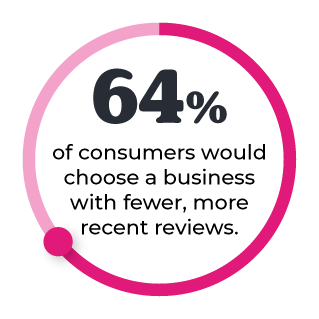
Survey Says: 64% of consumers would choose a business with fewer, more recent reviews than one with more reviews that were published three or more months ago.34
Keep the reviews flowing in so you have plenty of recent reviews to show off. Other practices in your area might see your review strategy working and start focusing on their own reviews, so don’t get complacent.
Once you focus on a review strategy, you should start to see your review numbers increase within a week. Your star rating might rise as well. Those are easy metrics to celebrate as they steadily rise.
From there, practice a little patience as you wait for those reviews to turn into new patients in the door. It takes some time for your position online to increase, and then some more for enough local prospects to search for a new dentist.
Once your review engine is up and running, start asking patients how they found your practice. Soon enough, you’ll start hearing from more patients than before that they “found you online,” and you’ll know you’re gaining traction.
Use your office records to keep an eye on your increase of new patients and appointment requests. Remember that you may earn more from each patient as some of the prospects who are drawn in by your reputation might be willing to go out-of-network or pay more for elective services.35
To get the full picture of your local market, it doesn’t hurt to check occasionally to see if your competitors are keeping up or falling behind.
While the good news is that reviews can lead to results pretty quickly, the bad news is that you have to keep momentum up by keeping your reviews recent. A temporary surge in reviews can only help for so long.
The results are so clearly worth it, but you need a strategy that can work for the long run.
Automation is your ticket to reach your goals faster and keep hitting the mark year after year.
Some of the busiest, most successful dental practices choose to automate their review generation to boost their profile online and propel their practices to new heights.
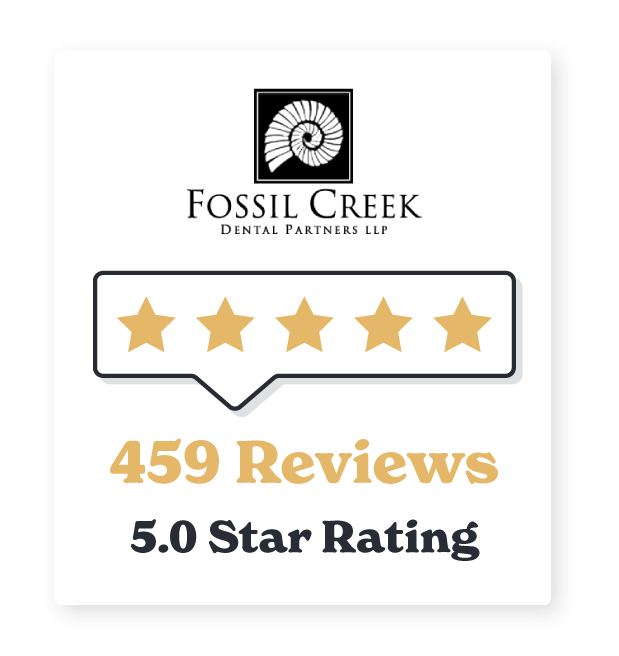
Dr. Chad Duplantis, with Fossil Creek Dental in Fort Worth, Texas, uses automatic review invitation text messages to generate reviews. After 5 years of trying to source reviews with QR codes, in-person requests, and even using their practice management software, they only earned 20 Google reviews.
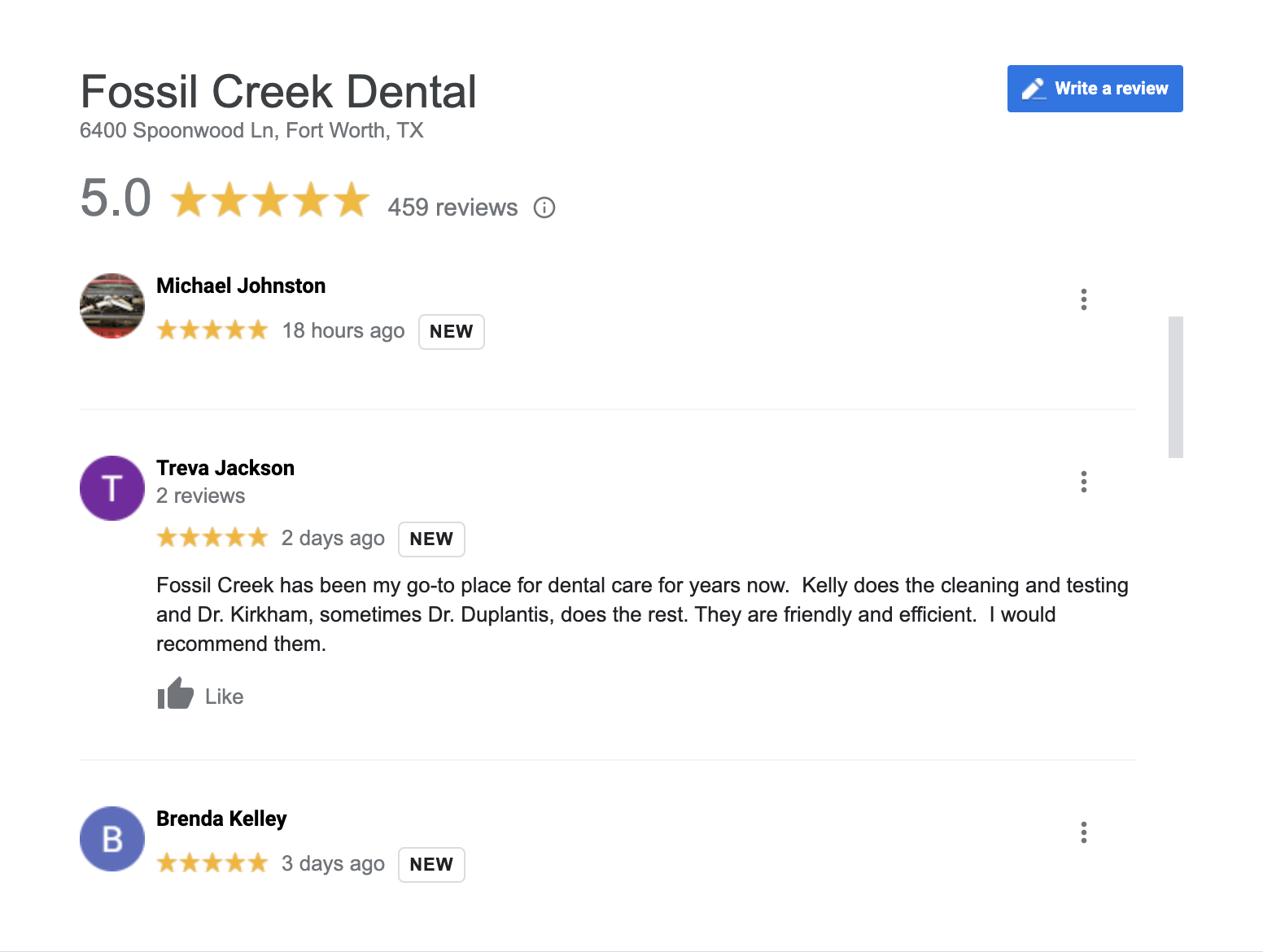
After 18 months of setting up automatic review invitations, they currently stand at 459 reviews and a 5.0 star rating.
That glowing reputation has an impact all the way down to the practice’s bottom line: 7/10 of Dr. Duplantis’s new patients say they found Fossil Creek through a Google search.
They’re nowhere near running out of steam, either. On almost any given day you check their Google profile, you’ll see new reviews submitted in the past 48 hours. We really mean it - Google “Fossil Creek Dental” and see for yourself.
How do they do it? They use Swell.
“Out of all the technology I’ve implemented in my practice, I have seen the most immediate return from Swell. It has paid for itself over and over and over.” - Dr. Duplantis
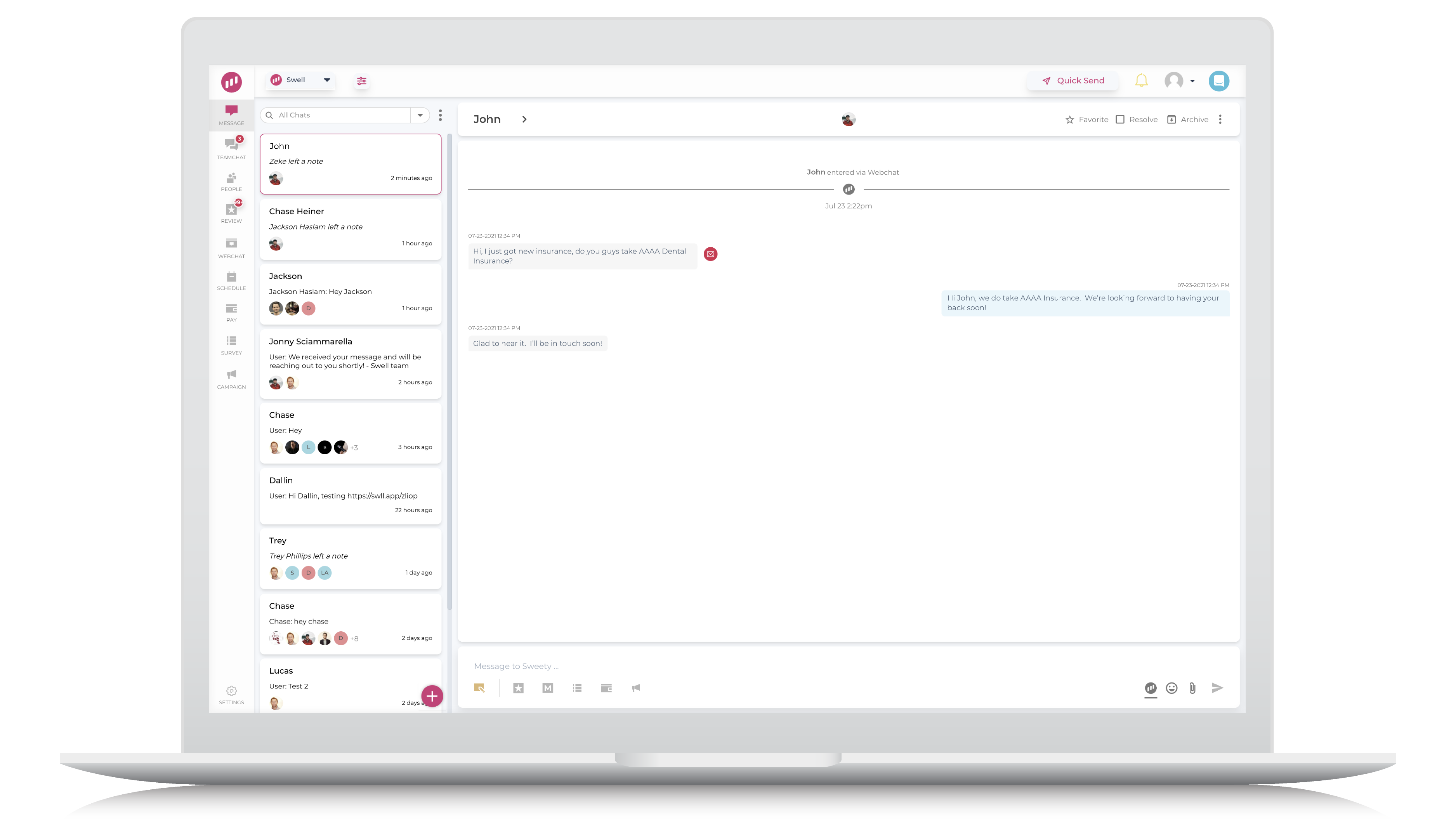
With Swell, practices can:
Set up automatic review text message invitations that will send timely texts to patients after a visit asking for a review and providing a link directly to Google to submit one.
Monitor and reply directly to reviews on Google, Yelp, and Facebook using templates that save serious time.
Communicate with patients via automated texts for things like appointment reminders or manual one-on-one chats for issues like patient questions or paperwork requests.
Convert website visitors with a webchat that collects prospects’ phone numbers and lets you answer questions or set up appointments seamlessly.
Coordinate between locations with a team chat function and the ability to assign incoming patient texts to the right location and team member automatically.
34 https://www.powerreviews.com/insights/review-volume-and-recency/
35 https://www.softwareadvice.com/resources/how-patients-use-online-reviews/
Implementing a strategy to earn new Google reviews is a no brainer for any practice that wants to grow or elevate its status and get more time back.
By letting Swell run automatically in the background, dental practices can convert the power of their happy patients into an online reputation that beats out their top-tier competitors so they can bring in more of the patients they want.
Learn more or get a demo at www.swellcx.com.